Here is our step-by-step guide to onboarding on the platform as an investor.
You can jump to the needed step or see our video guide just below:
- Getting started - Account set up
- Finalising the funding round
- Making payments
- Viewing your potential companies
- FAQs
Getting started - Account set up
Step 1
When you receive an email inviting you to the platform, click ‘Accept Invitation’.
This will take you to the pending invitation page, where you must create your account.
Step 2
Fill in all the required details:
- Your personal details
- Add your signature
- Either draw your signature or have the platform generate a digital one
Step 3
You must now enter your password to sign the Non-disclosure Agreement. If you and your founder have agreed upon skipping this step, please raise a ticket requesting this.
Note: The password used to set up your account is the same one needed to sign the NDA
Step 4
You will then be asked about your investor type. UK law restricts who companies can promote unlisted shares to, so to join a round on FounderCatalyst you'll need to confirm you are one of the following, then sign the matching Investor Statement by entering your password. This applies to every round, not only SEIS or EIS rounds.
High Net Worth investor - in the last financial year you had either:
- (A) an annual income of £100,000 or more, or
- (B) net assets of £250,000 or more (not including your main home, pension or certain insurance products)
Self-Certified Sophisticated investor - at least one of these applies to you:
- (A) you have been a member of a business angel network or syndicate for at least the last six months
- (B) you have made more than one investment in an unlisted company in the last two years
- (C) you work, or have worked in the last two years, in a professional capacity in private equity or in providing finance to small and medium-sized businesses
- (D) you are, or have been in the last two years, a director of a company with an annual turnover of at least £1 million
Your statement must have been signed within the last 12 months. If none of these applies to you, you should not invest through FounderCatalyst at this stage - you may wish to get independent financial advice.
These rules come from the Financial Promotion Order, as amended from 27 March 2024 (SI 2024/301).
Step 5
View and sign the term Sheet - again, by entering your password.
Finalising the funding round
Note: Until the Founder(s) lock the round for final signatures you are not required to sign anything else on the platform. Until then you can peruse the Intelligent Data Room
You will be prompted when the round is locked; at this point you will be able to view any further documents intended for you.
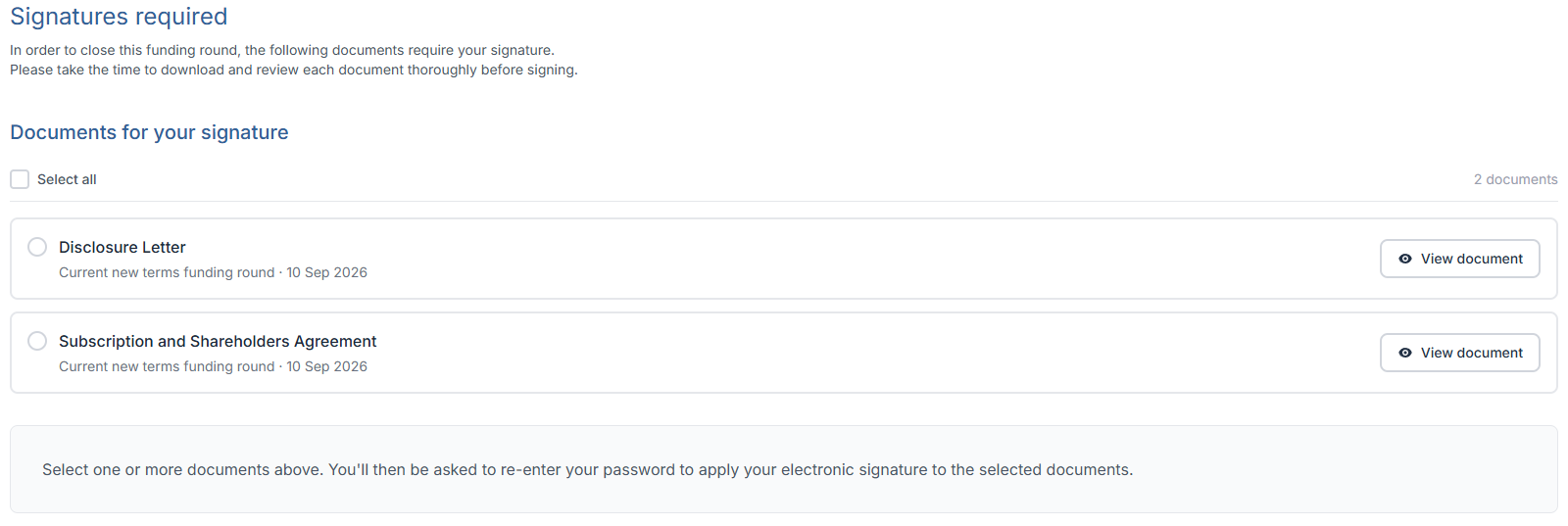
In order to sign them, go to ”Sign my Documents” in the left hand menu, or in the yellow box that appears top right on the main dashboard:

Select which documents you wish to approve and enter your password, as below:
Making payments
Finally, it's time to pay up! You can view the bank details of the company on the page shown below:
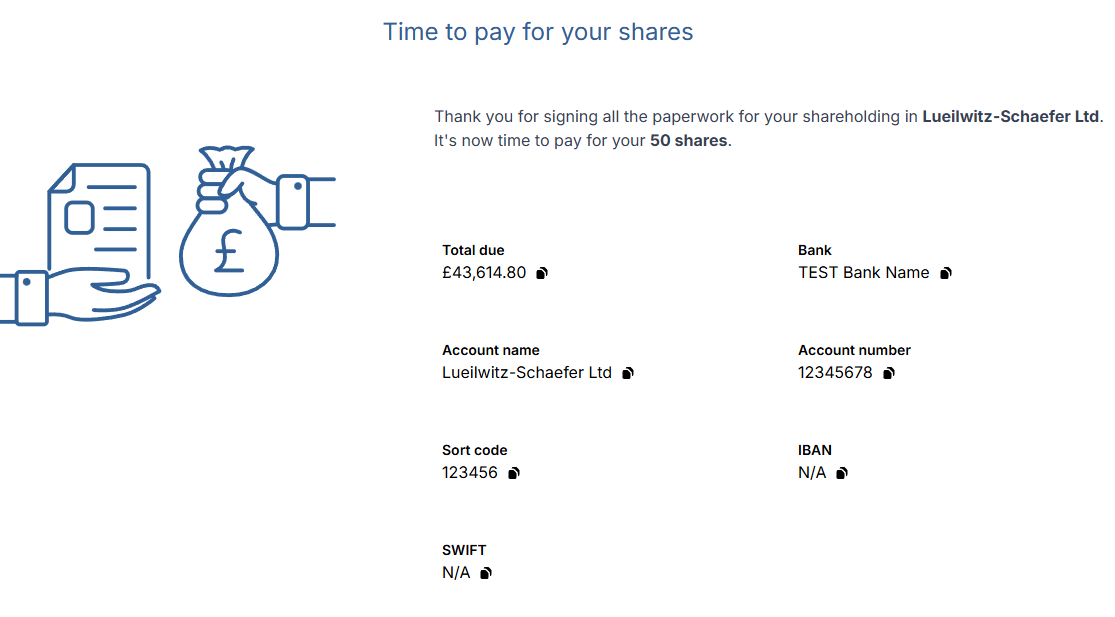
The Founder(s) will be able to issue Share Certificates once they have received payment.
Viewing your potential companies
You may have multiple companies to invest in, luckily we keep everything in one place to make life easier.
If you wish to view any other companies that you have been invited to, go to the top of the left-hand menu, and click the dropdown arrow next to the company name. This will show you the list of companies you can view.
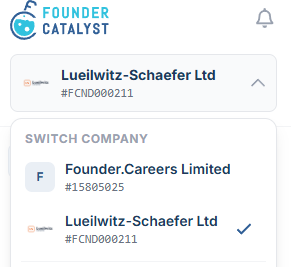
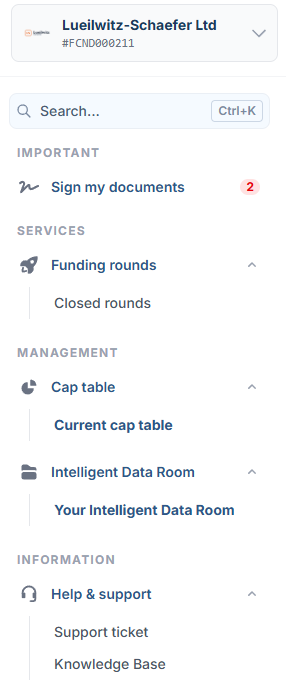
Once you have selected the company you wish to view, you will be able to look at both the existing Cap table and pending Cap table, along with the Intelligent Data Room (IDR).
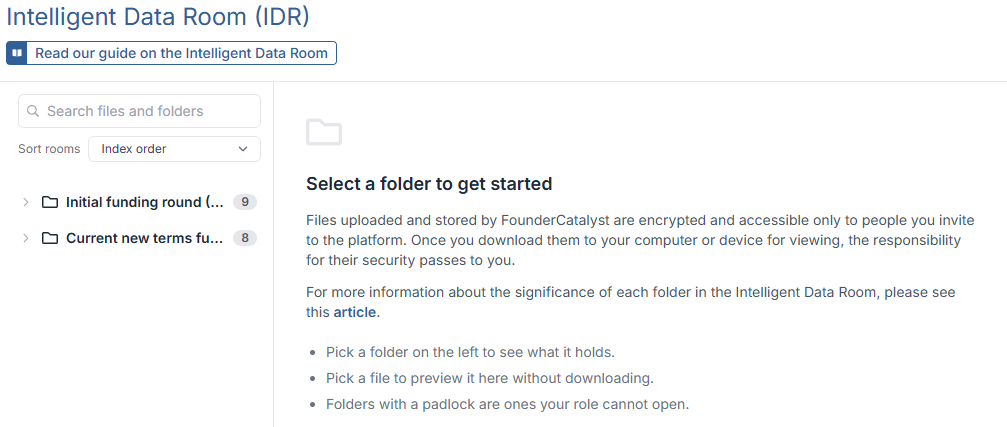
From within the IDR, you will be able to see any documents relevant to you from the funding rounds. If you are an ‘Entry Level’ investor, you will only be able to see Folder 1 of the Current Funding Round.
FAQs
How do I set up as both an investor and advisor?
We recommend setting up with 2 different email addresses for an investor and advisor account respectively. If you stick to 1 account per role, you will be able to view your different potential companies to invest in, and to advise on your separate accounts.
I’m not receiving the invitation email?
To ensure you are able to access the account, please ensure that you have completed the sign-up process. This includes filling out all required fields and providing all necessary information, including adding a signature.
If you have already followed these steps, and yet still haven't received the email, please let us know and we can send out a fresh invitation.
I’ve been invited to an Agile round, but I cannot access it?
Agile rounds can't have "entry level investors" (normal investors in funding rounds with an uncommitted number of shares). Note that "Entry Level" is a FounderCatalyst round setting, not a regulatory investor type. Ask your founder to set you as having any number of shares, even if you haven’t committed to anything yet.
Getting Setup
If a company you're interested in has told you to create an account on FC - don’t; wait for them to send you an invitation link, then complete all fields required.
Do I need to be a self certified sophisticated investor/high net worth individual?
Please note: this answer does not constitute regulatory or legal advice.
Yes. We are required to ask these questions under the Financial Promotion regulations, as amended from 27 March 2024 - you can read the legislation here.
This isn't in any way related to SEIS or EIS - the same rules apply if you invest outside of these schemes too.
We have followed advice from the UK Business Angels Association and their legal counsel when implementing the legislation. You should only invest if you meet at least one of the criteria in the High Net Worth or Self-Certified Sophisticated Investor statements (see Step 4 above).
To qualify as a High Net Worth Individual, you need to declare either Condition A or B. To qualify as a Self-Certified Sophisticated Investor, you need to declare one of Conditions A, B, C or D.
Please answer accurately. The founder doesn't need to see evidence, but they rely on your signed statement when sharing investment details with you, so it's important that it's correct.
Ultimately we implement this process as a protection for both the founder and investor.
What about other investor types, such as Everyday or Restricted investors?
Everyday (also called "Restricted") investors can only receive these types of investment offers through an FCA-authorised firm, such as an investment crowdfunding platform. That firm must carry out extra checks, including an appropriateness test and a 24-hour cooling-off period. This route isn't available on FounderCatalyst.
How do I change my details?
For any changes to your personal details, see this article.
Can potential investors looking through the data room, before they invest, see other potential investors?
Yes, each investor appears in the CapTable and the investment documents.
Captable - it is very standard for CapTables to be open (not least because details are published openly on Companies House anyway). If investors do not want to be public then they can use an SPV instead.
Documents - the draft documents contain the names of other potential investors, specifically the Term Sheet and Subscription and Shareholders agreements list all current and proposed investors in a round.